
CD-ROM problems in the last two years I could not Win xp setup. But with pen drive setup procedure refers to that blog post, I could not work with it and after trying many times. I scream out at 1 from the writing I've succeeded. So, to share with you!---------------1. CD / DVD-ROM CD / DVD Insert the disc.Disk copy and paste it into a folder on any drive.(PS: Remember, if the antivirus is installed, to enable them to be copied. Because your copied files, the antivirus can we lost.)2erapara WinSetupFromUSB download the software,From the following links:
Link 1 (latest version), 422 mb
Links to the 682 mb
3. Pen drive attached to the PC, and PC formatted drive attached to the place.4. Once you download the software to turn WinSetupFromUSB.5. WinSetupFromUSB After starting the software, the operating system you want to make a bootable pen drive, click the check box next to its name,Then click the browse button, the folder, CD / DVD disc kept a copy, select the folder and click OK.6. Click on the GO button. Boot process will start.7. Wait a few minutes (5-10 minutes).8. Boot process was complete "Job Done! '' Message will appear.
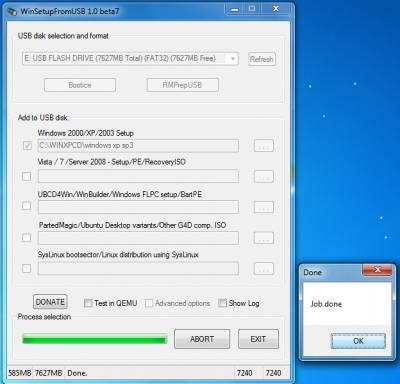
Click OK. Then click on the EXIT button.9. Restart the PC and enter the boot menu, First Boot Device to select the USB Device.10pena After the boot from the drive will start working automatically to the next option.After the boot from the drive penaTry (hd0,0): FAT 32:.....................Show,After a while of»EXPERIMENTAL-Start PLoP boot manager»Windows XP / 2000/2003 Set upApasanagulo actually have to wait 8 seconds.Then again,»First part of windows xp professional sp2 / sp3 setup from partition 0»Second part of 2000 / xp / 2003 setup / Boot first internal hard diskIn fact, the options will have to wait 8 seconds.(Windows XP option that will, in the case of Windows 7/8 and drive come from almost the same options as the first boot after 8 seconds to 8 seconds, and then back again)Here is one thing that is particularly noteworthy, "pen drive, boot from the first 8 seconds, and then again, is better than 8 seconds.It includes a little change here, the Windows installation may cause disruption. "This is enough to be aware of.
For the first time it will be the beginning of the Windows setup.
11. Other tasks, CD / DVD, as well as the Windows Complete ।